What is the terminator line in shading?
Short answer
The terminator line is the distinct boundary on a three-dimensional object separating the illuminated side from the shadowed side. It marks the precise point where light rays become tangent to the surface, creating the transition from highlight to shadow. This line is essential for defining form and volume in realistic drawing.
On this page
What is the terminator line in art?
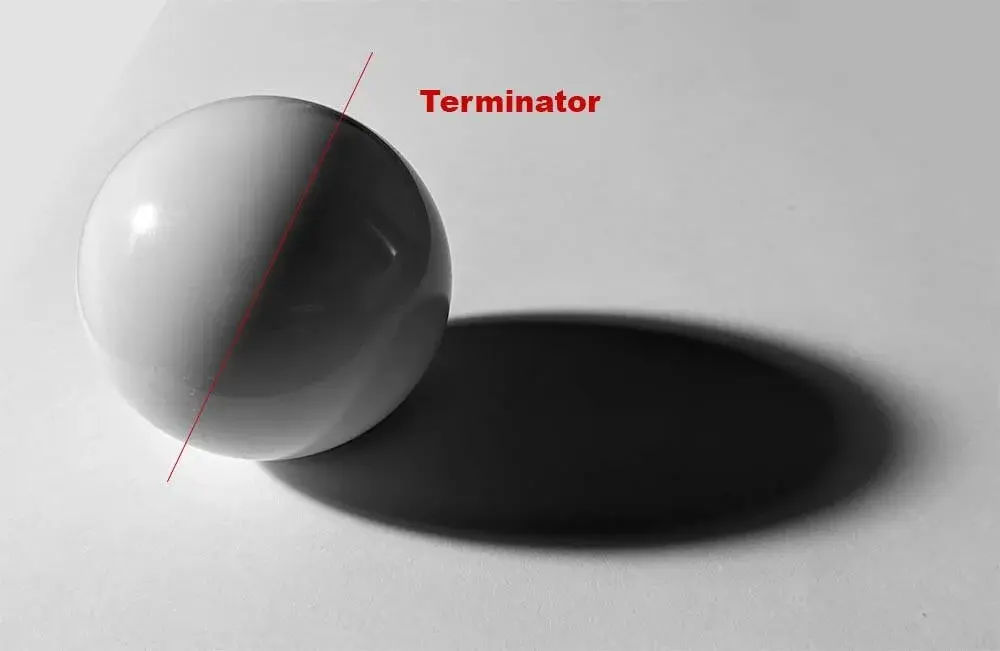
In representational drawing and painting, the terminator line acts as the visual threshold between light and dark. It is not necessarily a hard, thin line drawn with a pencil; rather, it is a zone where the light source no longer hits the surface of an object. On a sphere, for instance, the terminator line creates the transition into the core shadow. Understanding this boundary is critical for artists because it dictates how the eye perceives the curvature and mass of an object.
When light hits a curved surface, it gradually loses intensity until it reaches the point of tangency. Beyond this point, the surface enters the shadow side. If the light source is small and sharp, such as a single lightbulb, the terminator line appears crisp and well-defined. If the light source is large or diffused, such as light coming through a window, the terminator line becomes soft and blurred. Mastering this distinction allows artists to manipulate the perceived depth of their subjects.
How to find the terminator line on an object
Locating the terminator line requires careful observation of how light interacts with geometry. You must identify the direction of the light source relative to the object's planes. For beginners, it is helpful to visualize the light rays as parallel lines striking the surface. The terminator occurs exactly where these rays graze the surface at a 90-degree angle to the surface normal.
To accurately map the terminator line on a complex subject, follow these steps:
- Identify the primary light source and its angle of incidence.
- Observe the brightest highlight on the object, which indicates the point closest to the light.
- Trace the path where the light begins to wrap around the form and disappear.
- Mark this transition zone lightly on your paper to establish the edge of the core shadow.
- Adjust the sharpness of this line based on the softness of the light source.
Why the terminator line changes with light
The appearance of the terminator line is directly influenced by the nature of the light source. A direct, point-source light, like a flashlight in a dark room, produces a high-contrast terminator with a very sharp edge. This creates a dramatic effect often seen in chiaroscuro painting, where the separation between light and shadow is abrupt and intense.
Conversely, ambient or indirect light creates a much wider, softer terminator. When light bounces off walls or ceilings, it fills in the shadow side, causing the terminator to lose its definition. In such environments, the transition from light to shadow becomes a gradual gradient rather than a distinct line. Recognizing these variations is vital for capturing the mood of a scene. If you fail to adjust the terminator based on the light quality, your drawings will appear flat or disconnected from their environment.
Common mistakes when drawing the terminator
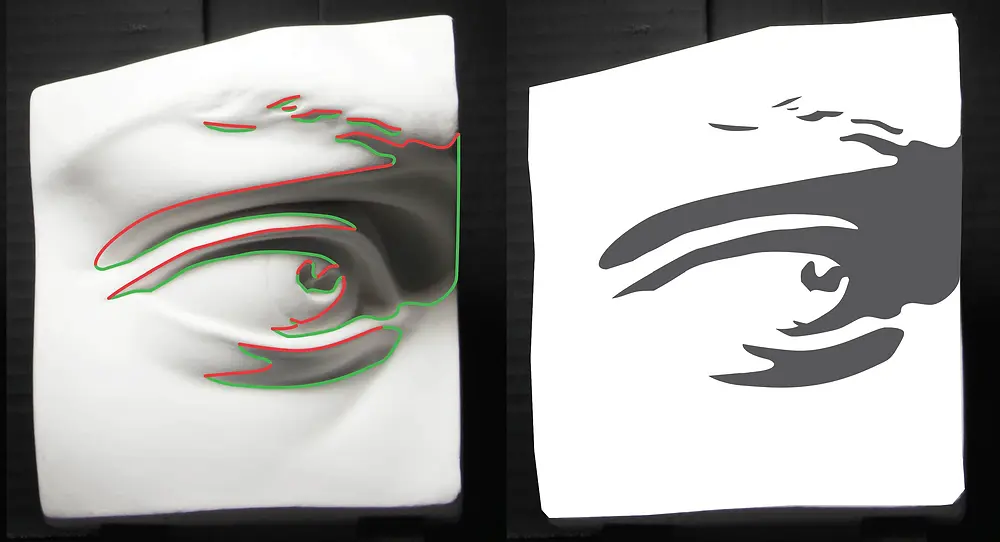
One of the most frequent errors artists make is drawing the terminator line as a harsh, black outline. In reality, the terminator is a value shift, not a contour line. Treating it as a hard edge often makes objects look like flat cutouts rather than three-dimensional forms. Another common mistake is placing the terminator in the wrong position relative to the light source, which destroys the internal logic of the image.
To improve your shading, avoid these common pitfalls:
- Relying on heavy pencil pressure to define the shadow side.
- Ignoring the reflected light that often appears within the shadow area.
- Forgetting that the terminator line follows the contour of the object's surface.
- Making the terminator line perfectly straight on curved objects.
- Failing to soften the edge when the light source is diffused.
- Placing the terminator too close to the edge of the object, which flattens the volume.
Best techniques for shading the terminator
Achieving a realistic terminator requires a combination of observation and technical skill. Start by establishing your light and shadow shapes early in the drawing process. Keep your initial marks light so you can adjust the placement of the terminator as you refine the proportions. Using a blending stump or a soft brush can help you create the smooth transitions necessary for curved surfaces, while cross-hatching can provide more texture for rigid forms.
When rendering the transition, focus on the value contrast between the light side and the core shadow. The area immediately adjacent to the terminator on the shadow side is typically the darkest part of the object, known as the core shadow. By keeping this area dark and allowing it to transition into reflected light, you create a convincing sense of weight and volume. Always check your work against the reference to ensure that the terminator line maintains the integrity of the object's three-dimensional shape throughout the entire shading process.
Key facts
- The terminator line is the physical boundary on a 3D object where light transitions into shadow.
- It is not a hard outline but a gradual shift known as the "core shadow" on curved surfaces.
- Placing the terminator line accurately is the most important step in establishing the form and volume of an object.
- On a sphere, the terminator line is always a curve that follows the contour of the shape.
- If the light source is a point, like a lightbulb, the terminator line will be sharper than if the light is diffused.
- Artists often exaggerate the terminator line to create a sense of drama or high contrast in a drawing.
The bottom line
The terminator line serves as the vital transition point between light and shadow, acting as the foundation for rendering three-dimensional volume on a two-dimensional surface. By mastering the placement and softness of this boundary, you can effectively communicate the shape and weight of any subject. Remember that it is a dynamic feature that shifts with your light source, requiring careful observation to achieve realistic results.
People also ask
Why does the terminator line look different on a cube versus a sphere?
On a cube, the terminator line is a sharp, distinct edge because the surface planes change direction abruptly. On a sphere, the surface curves continuously, causing the terminator to appear as a soft, blended transition rather than a crisp line.
Does the terminator line move if I move the light source?
Yes, the terminator line is entirely dependent on the position of the light source relative to the object. As you move a lamp around a subject, the boundary between light and shadow rotates to maintain its orientation toward the light.
What is the difference between the terminator line and the core shadow?
The terminator is the theoretical line where light ceases to hit the object, while the core shadow is the darkest band of shading that sits just inside that line. They are closely related, as the core shadow defines the region where the light is most obstructed.
Can an object have more than one terminator line?
Yes, if an object has multiple light sources, it will have multiple terminator lines. Each light source creates its own shadow boundary, which can result in complex overlapping shadows and highlights.
How do I find the terminator line when drawing from life?
Squint your eyes while looking at the subject to blur the details and simplify the values. This makes it easier to identify the exact point where the light side ends and the dark side begins.
Is the terminator line always the darkest part of an object?
Not necessarily, as reflected light often hits the dark side of an object, making the area near the edge lighter than the core shadow. The darkest part is usually the core shadow located just past the terminator.
This answer was created with the help of AI research tools and reference sources. Spotted an error? Let us know — we correct mistakes quickly. See our editorial policy.