What is Procreate Dreams?
Short answer
Procreate Dreams is a professional 2D animation software developed by Savage Interactive, released for iPad in November 2023. It provides a touch-first interface for creating hand-drawn animations, motion graphics, and frame-by-frame sequences. The app integrates seamlessly with the original Procreate app, allowing artists to import brushes and layers into an intuitive timeline.
On this page
What is Procreate Dreams used for?
Procreate Dreams is a comprehensive animation studio designed specifically for the iPad. It allows artists to move beyond static illustrations by providing a robust environment for frame-by-frame animation, keyframe-based motion, and real-time performance recording. Unlike traditional desktop software that relies on complex menus and keyboard shortcuts, this application utilizes intuitive touch gestures to manipulate objects, adjust timing, and organize complex scenes.
The software is primarily used by digital illustrators and animators looking to create high-quality 2D content without the steep learning curve of professional desktop suites. It supports high-resolution canvases, allowing for 4K video output, and handles large files by utilizing the iPad’s hardware acceleration. Whether you are creating short social media clips, character-driven narrative shorts, or complex motion graphics, the app provides the necessary tools to manage layers, audio, and visual effects in a single, unified workspace.
How to get started with Procreate Dreams
Getting started with the software is straightforward, provided you understand the basic navigation of the timeline. The interface is divided into the stage, where your artwork lives, and the timeline, where you control the passage of time. To begin a project, you select a canvas size and set your desired frame rate, which typically defaults to 12 or 24 frames per second.
- Open the app and tap the "+" icon to create a new movie.
- Choose a preset resolution or define your own custom dimensions.
- Use the "Draw and Paint" mode to create your initial assets or import existing files from the original Procreate app.
- Drag the playhead across the timeline to scrub through your animation.
- Use the "Perform" feature to record live movements of your layers in real-time.
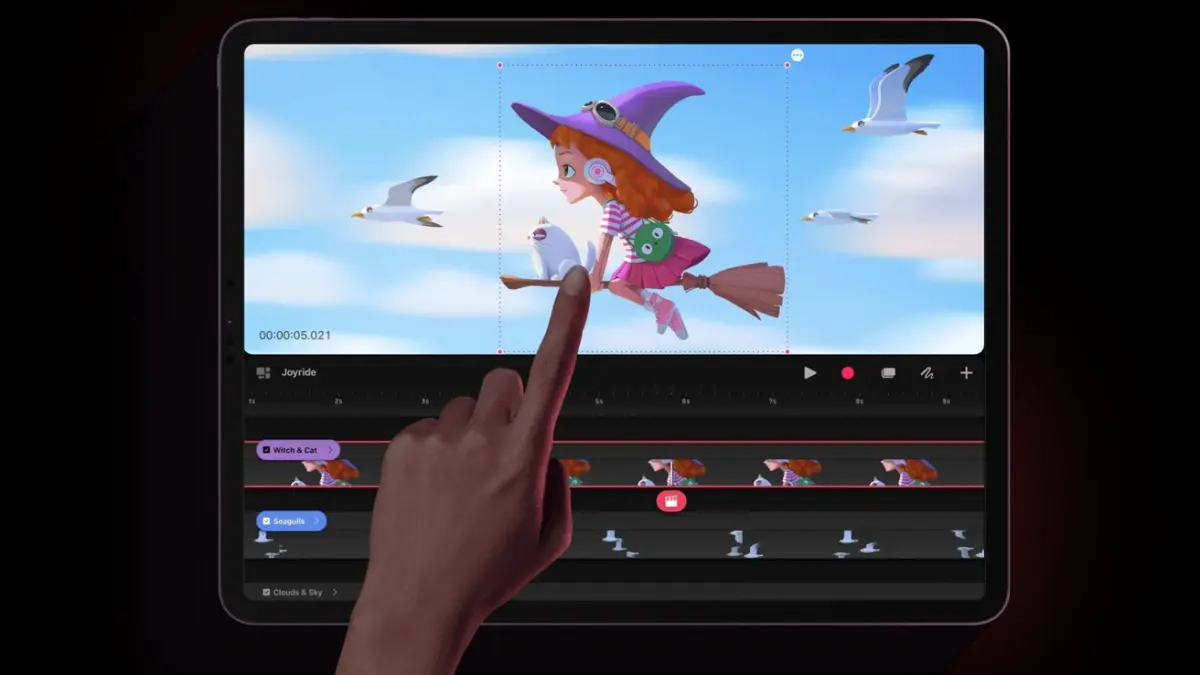
Once your assets are on the stage, you can use the "Track" system to organize your animation. Each track acts like a layer, holding your drawings, audio clips, or group folders. By tapping on a track, you can access the editing menu to split, group, or delete content, ensuring your project remains organized as it grows in complexity.
What are the key features of Procreate Dreams?
The software distinguishes itself through several unique features that prioritize fluid motion and interactive design. One of the most significant tools is the "Perform" feature, which allows you to record your finger or Apple Pencil movements to animate objects. As you play your animation, you physically move the object on the screen, and the app records those movements as keyframes, creating organic, human-like motion that is difficult to achieve with traditional manual keyframing.
Another essential feature is the multi-touch timeline, which allows for rapid editing. You can select multiple frames, move them, or adjust their duration with simple gestures. The app also supports advanced features like onion skinning, which displays ghosted versions of previous and subsequent frames, and a powerful audio engine that allows for easy synchronization of voiceovers and sound effects. These tools work together to create a seamless workflow that emphasizes creativity over technical configuration.
- Keyframe animation for smooth transitions.
- Real-time performance recording for organic motion.
- Advanced onion skinning for precise frame control.
- Seamless integration with existing Procreate brushes and files.
- High-resolution rendering up to 4K.
Common mistakes when using Procreate Dreams
A frequent error for beginners is failing to organize tracks early in the process. When you have dozens of layers and audio clips, the timeline can become cluttered, making it difficult to find specific elements. Always use the "Group" function to bundle related assets together. Another common mistake is ignoring the frame rate settings at the start of a project; changing the frame rate after you have already animated significant portions of your work can lead to timing issues and jittery motion.
Artists also often underestimate the importance of the "Content" menu. Many users struggle to find specific editing options because they forget that the menu changes based on whether you are in "Draw" mode or "Timeline" mode. If you find yourself unable to edit a specific object, check your current mode to ensure you are interacting with the correct layer or track. Finally, avoid working on extremely large canvases if you do not need them, as this can lead to performance lag on older iPad models.
How to export and share your work
Once your animation is complete, exporting your work is a simple process designed for quick sharing. The app supports several standard video formats, including ProRes and HEVC, which provide excellent quality while maintaining manageable file sizes. To export, you navigate to the share menu, select your preferred resolution, and choose the file format that best suits your needs. You can export the entire movie or just a specific section of the timeline.
- Select the "Share" icon in the top menu.
- Choose "Movie" to render your full project.
- Select your desired resolution and frame rate.
- Save the file to your iPad’s Files app or share it directly to cloud storage.
When sharing your work, always double-check your audio levels before rendering. Because the app allows for complex audio layering, it is easy to have conflicting tracks that sound fine in the app but become distorted in the final export. Use the "Audio" track settings to adjust volume levels and ensure that your final product sounds as professional as it looks. By following these steps, you can confidently produce and distribute your animated projects to any platform.
Key facts
- Procreate Dreams is a dedicated 2D animation app developed by Savage Interactive, released on November 22, 2023.
- It operates exclusively on iPadOS and is designed to work seamlessly with the Apple Pencil.
- The software utilizes a unique "Multi-touch timeline" that allows users to animate, edit, and add audio in a single workspace.
- It supports high-resolution projects up to 8K, depending on the capabilities of the specific iPad model.
- Users can import existing Procreate files, allowing for the animation of layers and assets created in the original painting app.
- The app uses a one-time purchase model rather than a subscription, making it a distinct product from the original Procreate app.
The bottom line
Procreate Dreams is a powerful, standalone animation tool that brings professional-grade 2D motion design to the iPad. By combining a touch-friendly timeline with advanced features like real-time performance recording and high-resolution support, it streamlines the animation process for both hobbyists and professionals. It serves as an essential companion for artists looking to transition from static illustrations to dynamic, multi-layered storytelling without needing complex desktop software.
People also ask
Is Procreate Dreams included with my Procreate subscription?
No, Procreate Dreams is a separate application that requires a one-time purchase from the App Store. It is not an update to the original Procreate painting app.
Can I use Procreate Dreams on a desktop computer?
No, the software is built specifically for iPadOS and is not available for macOS, Windows, or Android devices. It relies heavily on touch and Apple Pencil input.
What file formats can I export from the app?
You can export your animations as MP4 video files, animated GIFs, or as individual frames in PNG format. You can also export the project file itself to share with other users.
Does the app support layers like the standard Procreate app?
Yes, it uses a track-based system that functions similarly to layers, allowing you to organize your animation elements. You can group tracks and manipulate them as single units to keep your timeline clean.
Can I record voiceovers directly into the app?
Yes, the app includes a built-in recording feature that allows you to capture audio directly onto the timeline. This is useful for lip-syncing and adding sound effects to your animation.
What is the best way to learn the interface?
The app features a "Performing" mode that lets you record your movements in real-time to create fluid animations. Practicing this feature is the fastest way to understand how the software handles keyframes and motion.
This answer was created with the help of AI research tools and reference sources. Spotted an error? Let us know — we correct mistakes quickly. See our editorial policy.