What is panning in photography?
Short answer
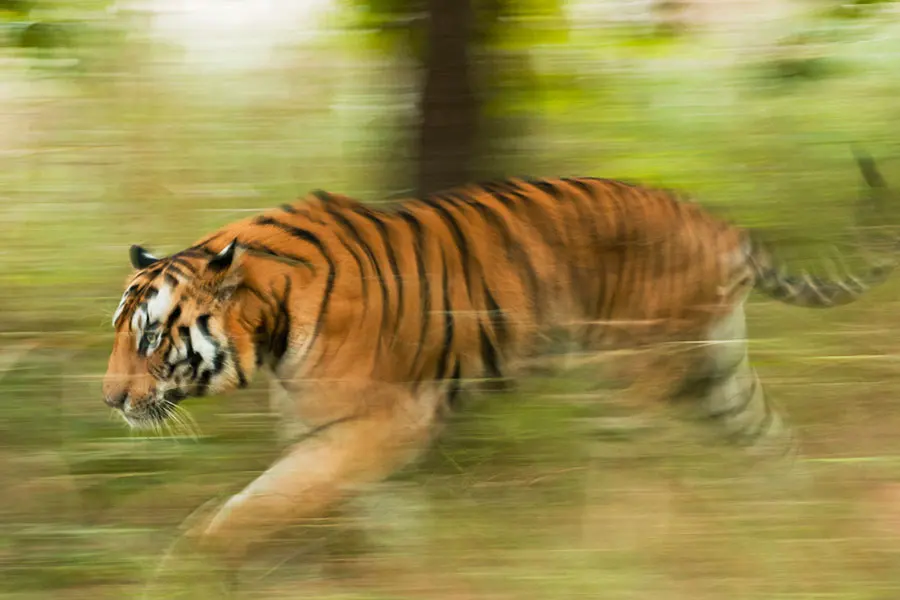
Panning is a photographic technique used to capture a moving subject while keeping it relatively sharp against a blurred, streaked background. By moving the camera in sync with the subject's speed and direction during a long exposure, photographers create a strong sense of motion, speed, and energy in a still image.
On this page
How does panning work in photography
Panning relies on the principle of relative motion. When you track a moving object with your camera, the subject remains stationary relative to your lens, while the background moves rapidly across the frame. Because the shutter remains open for a longer duration, the background records as a series of horizontal or vertical streaks, while the subject retains its structural detail. This contrast between the sharp subject and the motion-blurred environment is what gives the viewer the perception of high velocity.
To achieve this effect, the photographer must rotate their body at the waist to follow the subject's path. It is essential to maintain a smooth, consistent motion rather than jerky movements. If the camera speed perfectly matches the subject’s speed, the subject will appear crisp. If the camera moves faster or slower than the subject, the subject itself will also suffer from motion blur. Mastering this requires practice, as the technique is as much about physical coordination as it is about camera settings.
What camera settings are best for panning
Success with panning requires specific adjustments to your camera’s exposure settings. You generally need a shutter speed slow enough to allow the background to blur, typically ranging from 1/15 to 1/60 of a second, depending on the speed of the subject. A faster shutter speed will freeze the background, while a speed that is too slow will make it nearly impossible to keep the subject sharp. Aperture and ISO should be adjusted to balance the exposure for these longer shutter times.
- Set your camera to Shutter Priority (Tv or S) mode to maintain control over the duration.
- Select a slow shutter speed, starting around 1/30 of a second for vehicles or runners.
- Use a low ISO setting to prevent overexposure in bright conditions.
- Set your aperture to a higher f-number, such as f/8 or f/11, to reduce light intake.
- Consider using a neutral density filter if the ambient light is too bright to allow for slow shutter speeds.
How to practice panning for beginners
The best way to learn panning is to start with predictable subjects. Moving cars, cyclists, or runners on a track are ideal because they follow a consistent path and speed. Find a location where you have a clear, unobstructed view of the subject’s trajectory. Position yourself so that you can follow the subject throughout its entire arc of motion, ensuring you have enough space to rotate your torso comfortably.
- Start by focusing on a point where the subject will pass.
- Begin tracking the subject before it reaches your frame.
- Keep the subject centered in your viewfinder throughout the movement.
- Press the shutter button while continuing to move the camera.
- Follow through with the motion even after the shutter has closed.
Consistency is key to improvement. Do not be discouraged if your first few attempts result in blurry subjects; this is a standard part of the learning process. Review your images to see if the subject is too blurry or if the background lacks enough motion, then adjust your shutter speed accordingly.
Why panning creates motion blur
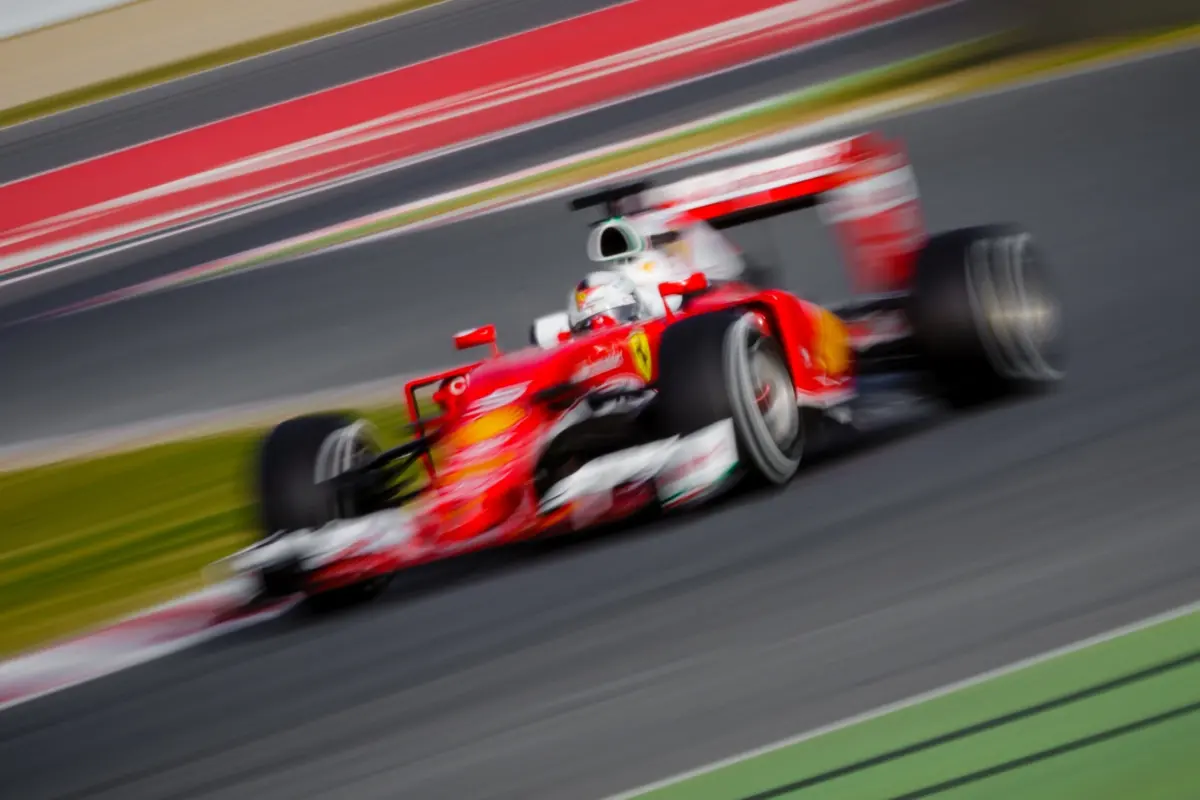
The visual effect of panning is a result of the camera sensor recording the light path of the background while the subject remains fixed on the sensor grid. When the shutter stays open, the background objects—such as trees, buildings, or spectator stands—travel across the sensor, creating lines of color and light. Because the camera is moving at the same angular velocity as the subject, the subject’s position on the sensor remains constant, preventing the light from that specific area from smearing.
This technique is widely used in sports photography and motorsports to convey the intensity of the action. Without panning, a race car captured at a high shutter speed would look like it is parked on the track, even if it is traveling at 200 miles per hour. Panning provides the necessary visual context that the subject is in motion, turning a static image into a dynamic narrative that captures the essence of the event.
Common mistakes when panning
One of the most frequent errors is failing to follow through with the movement. Many photographers stop moving the camera the moment they press the shutter button, which causes the subject to blur at the end of the exposure. Another common issue is using a shutter speed that is too fast. If you use 1/500 of a second, the background will not have enough time to blur, resulting in a standard photograph that lacks the intended sense of speed and artistic motion.
- Avoid using image stabilization if you are using a tripod, as it can fight against your panning motion.
- Do not lock your elbows; keep your arms relaxed to ensure a fluid, sweeping movement.
- Ensure your focus is locked on the subject; using continuous autofocus (AF-C or AI-Servo) is highly recommended.
- Watch your framing; leaving too little space in front of the moving subject can make the composition feel cramped and unnatural.
- Do not stand too close to the subject, as it becomes significantly harder to track the object accurately at close range.
Key facts
- Panning is a technique where you move your camera along with a moving subject to keep it sharp while blurring the background.
- Use a shutter speed between 1/30 and 1/60 of a second to achieve the desired motion blur effect.
- Set your camera to Shutter Priority mode (Tv or S) to maintain full control over the exposure duration.
- Keep your feet planted firmly and rotate your torso to follow the subject in a smooth, fluid motion.
- Continuous autofocus (AF-C or AI Servo) is essential to track the subject as it moves across your frame.
- Practice by photographing cyclists or cars moving parallel to your position to master the necessary speed and timing.
The bottom line
Panning is an essential creative technique that transforms static images into dynamic representations of speed and energy. By matching your camera’s movement to a subject’s path and utilizing a slower shutter speed, you create a sharp subject set against a streaked background. Mastering this skill requires patience, steady physical form, and consistent practice to ensure your movements remain fluid throughout the entire duration of the exposure.
People also ask
What is the best shutter speed for panning?
A shutter speed between 1/30 and 1/60 of a second is ideal for most subjects. Faster speeds may freeze the background, while slower speeds make it difficult to keep the subject sharp.
Why are my panning shots always blurry?
You are likely moving the camera at a different speed than the subject or failing to follow through after the shutter clicks. Ensure your movement is smooth and matches the subject's velocity precisely.
Do I need a tripod for panning?
A tripod or monopod can help keep your horizontal movement steady and prevent vertical shake. However, many photographers prefer handheld shooting for greater flexibility when tracking unpredictable subjects.
What is "follow-through" in panning?
Follow-through refers to continuing the camera's motion even after you have pressed the shutter button. Stopping abruptly often causes the subject to blur, so keep moving until the exposure is complete.
How does aperture affect panning?
Since your shutter speed is fixed, you should use a smaller aperture (higher f-number) in bright light to prevent overexposure. If it is dark, use a wider aperture to let in more light.
Can I pan with a wide-angle lens?
While possible, wide-angle lenses make panning more difficult because you must be very close to the subject. Telephoto lenses are generally preferred as they compress the background and make the motion blur more pronounced.
This answer was created with the help of AI research tools and reference sources. Spotted an error? Let us know — we correct mistakes quickly. See our editorial policy.