What is motion blur?
Short answer
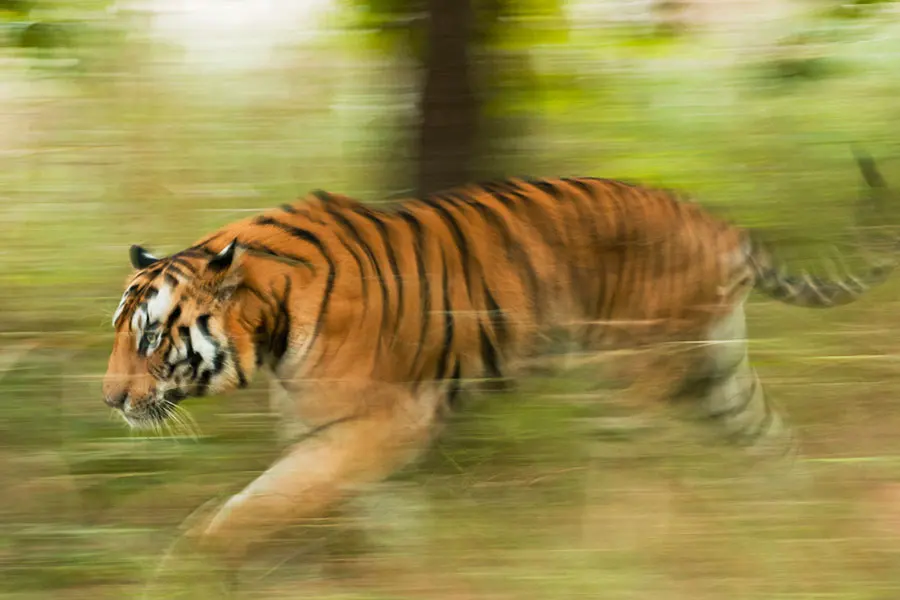
Motion blur is the streaking effect observed in images or video when a subject moves rapidly relative to the camera’s exposure time. It occurs because the sensor records the subject's path across the frame during the interval the shutter remains open, resulting in a visual representation of motion rather than a frozen moment.

On this page
Why motion blur happens
Motion blur is a physical phenomenon rooted in the mechanics of light capture. When a camera shutter opens, it exposes the sensor to light for a specific duration, known as the shutter speed. If an object moves across the field of view while the shutter is open, the sensor tracks that movement as a continuous trail of light. The longer the shutter remains open, the further the object travels during the exposure, and the more pronounced the resulting blur becomes.
This effect is not a malfunction but a fundamental property of photography and cinematography. In film, a standard frame rate of 24 frames per second typically utilizes a 180-degree shutter angle, which creates a natural amount of blur. This mimicry of human vision helps motion appear fluid rather than staccato. Without this blur, moving images would look jittery and unnatural to the human eye, which naturally perceives motion as a series of blended transitions.
How to control motion blur
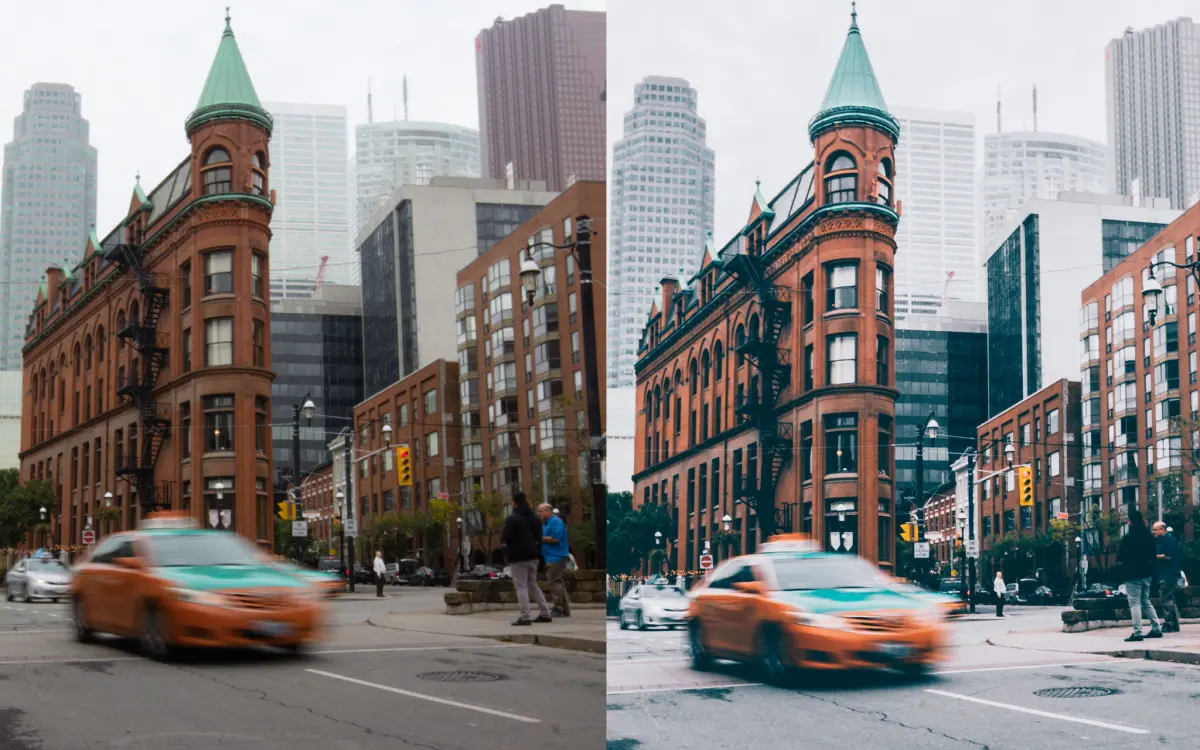
Photographers and videographers manipulate shutter speed to either embrace or eliminate motion blur. To freeze fast-moving subjects like athletes or wildlife, you must use a high shutter speed, such as 1/1000th of a second or faster. Conversely, to intentionally create a sense of speed, such as blurring a waterfall or the light trails of cars at night, you should use a slow shutter speed, often requiring a tripod to keep the stationary parts of the frame sharp.
To effectively manage motion blur, follow these technical guidelines:
- Use "Shutter Priority" mode on your camera to manually set the speed while the camera calculates the aperture.
- Utilize a neutral density filter when shooting in bright daylight to allow for longer exposures without overexposing the image.
- Understand the "reciprocal rule," which suggests your shutter speed should be at least the inverse of your lens focal length to avoid blur caused by hand-shake.

Best settings for motion blur
Achieving the perfect balance depends entirely on your creative intent and the speed of your subject. For general handheld photography, a shutter speed of 1/60th of a second is often the threshold where camera shake begins to introduce unwanted blur. If you are panning—following a moving subject with your camera—you can use slower speeds like 1/30th or 1/60th to keep the subject relatively sharp while blurring the background into a dynamic streak.
When filming video, the "180-degree shutter rule" remains the gold standard for professional results. This rule dictates that your shutter speed should be double your frame rate. For example, if you are shooting at 30 frames per second, your shutter speed should be set to 1/60th of a second. Following these settings ensures that the motion blur looks consistent and cinematic, preventing the "choppy" look often seen in high-frame-rate footage that lacks sufficient blur.
Common mistakes when capturing motion
One of the most frequent errors beginners make is failing to account for camera stability during long exposures. Even if you intend to capture motion blur, any unintended movement of the camera itself—such as hand tremors—will result in a muddy, incoherent image rather than a clean, artistic blur. Always use a sturdy tripod or a flat, stable surface when shooting at shutter speeds slower than 1/60th of a second to ensure that only the intended subject is blurred.
Another common pitfall is ignoring the relationship between light and movement. If you attempt a long exposure in a brightly lit environment without adjusting your settings, the image will be completely white or "blown out." You must balance the exposure triangle:
- Reduce your ISO to the lowest possible setting to minimize light sensitivity.
- Narrow your aperture (increase the f-stop number) to restrict the amount of light entering the lens.
- Use a neutral density filter to physically block excess light, allowing for the desired long exposure time.
How to fix motion blur in post-production
It is important to understand that traditional motion blur caused by a slow shutter speed is extremely difficult to remove once captured. Unlike digital noise or minor focus issues, motion blur represents a loss of spatial data; the sensor has recorded the subject in multiple positions simultaneously. While modern software can attempt to "deblur" images, these tools often introduce artifacts or unnatural textures that degrade the overall quality of the photograph.
If you find that your images are consistently blurry, the best approach is to refine your technique rather than relying on software fixes. Focus on these preventative measures:
- Increase your ISO to allow for a faster shutter speed if you are shooting in dim lighting.
- Use a wider aperture to let in more light, which also enables a faster shutter speed.
- Practice "shutter discipline" by bracing your elbows against your body or using a monopod to minimize physical movement.
By mastering these foundational camera skills, you will gain full creative control over how motion is represented in your work, ensuring that every blur is intentional and aesthetically pleasing.
Key facts
- Motion blur is the streaking effect caused by a subject moving faster than the camera's shutter speed during an exposure.
- A faster shutter speed, such as 1/1000th of a second, freezes fast-moving action like a sports car or a bird in flight.
- A slower shutter speed, such as 1/30th of a second, intentionally creates blur to convey a sense of speed or motion.
- Panning is a technique where you move the camera along with a moving subject to keep the subject sharp while blurring the background.
- Using a tripod is essential when using slow shutter speeds to prevent unwanted camera shake from ruining your composition.
- Neutral density (ND) filters allow you to use slower shutter speeds in bright daylight without overexposing your image.
The bottom line
Motion blur is a fundamental tool in photography and cinematography that dictates how movement is perceived by the viewer. By mastering the relationship between shutter speed and subject velocity, you gain creative control over your imagery. Whether you choose to freeze time for absolute clarity or embrace the streak of a long exposure, understanding these mechanics ensures you capture the exact aesthetic intent of every shot.
People also ask
How do I avoid motion blur when I want a sharp photo?
To capture a crisp image, use a shutter speed that is at least the reciprocal of your lens's focal length. For example, if you are using a 200mm lens, set your shutter speed to at least 1/200th of a second or faster.
Why does my video look blurry when I move the camera quickly?
This occurs because the frame rate is too low to capture the rapid transition of pixels across the sensor. Increasing your frame rate, such as moving from 24fps to 60fps, can help reduce this effect during fast camera movements.
Is motion blur the same thing as being out of focus?
No, motion blur is caused by movement during the exposure, while being out of focus is caused by the lens failing to converge light correctly on the sensor. You can distinguish them because motion blur creates directional streaks, whereas out-of-focus blur creates soft, circular shapes.
Can I add motion blur to a photo after I have taken it?
Yes, editing software allows you to apply directional blur filters to specific parts of an image to simulate movement. However, these digital effects often lack the natural look of light trails captured by a physical camera sensor.
What is the "180-degree shutter rule" in filmmaking?
This rule suggests that your shutter speed should be double your frame rate to create natural-looking motion. For a standard film rate of 24 frames per second, you should set your shutter speed to 1/48th or 1/50th of a second.
Does image stabilization eliminate motion blur?
Image stabilization only compensates for small, accidental hand tremors or camera shake. It cannot freeze the motion of a subject that is moving independently through the frame.
This answer was created with the help of AI research tools and reference sources. Spotted an error? Let us know — we correct mistakes quickly. See our editorial policy.