What is RAW format in photography?
Short answer
RAW is a file format that captures all image data recorded by a digital camera’s sensor without processing. Unlike JPEGs, which are compressed and finalized by the camera, RAW files remain "digital negatives." They provide photographers with maximum control over exposure, white balance, and color grading during post-production editing software workflows.
On this page
What is a RAW file in photography
A RAW file contains the unprocessed light information captured by the camera's image sensor. When you take a photograph, the sensor records intensity and color data for every pixel, but it does not apply sharpening, contrast, or saturation adjustments. Because the camera does not discard data, these files are significantly larger than standard JPEG images, often requiring more storage space on memory cards and hard drives.
Think of a RAW file as the raw ingredients for a meal, whereas a JPEG is the finished dish served at a restaurant. With the raw ingredients, you can choose how much salt or spice to add, tailoring the final result to your personal taste. In photography, this means you can recover details in shadows or highlights that would otherwise be permanently lost if the camera had processed the image into a compressed format.
Why use RAW instead of JPEG
The primary advantage of shooting in RAW is the latitude it provides during editing. Because the file retains a much higher dynamic range, you can fix mistakes that would be impossible to correct in a JPEG. For instance, if you accidentally underexpose a shot, a RAW file allows you to brighten the image significantly while maintaining high image quality and minimal digital noise.
RAW files also allow for non-destructive editing. When you modify a RAW file in software like Adobe Lightroom or Capture One, you are not changing the original data. Instead, the software creates a set of instructions that sit on top of the file. You can revert to the original state at any time.
- Flexibility to adjust white balance after the shot is taken.
- Higher bit depth, usually 12 to 14 bits, resulting in smoother color transitions.
- Better performance when printing large-format images due to superior detail retention.
- Ability to apply different color profiles without losing original data.
How to edit RAW photos
Editing RAW files requires specialized software capable of interpreting the sensor data. Unlike JPEGs, which open in any basic image viewer, RAW files must be "developed" in a digital darkroom. This process involves a series of adjustments that transform the flat, neutral-looking RAW file into a polished photograph.
- Import your RAW files into your preferred editing software.
- Adjust the white balance to ensure colors look natural or match your creative intent.
- Use the exposure and shadow/highlight sliders to balance the lighting throughout the frame.
- Apply lens corrections to remove distortion or vignetting inherent to your camera lens.
- Export the final image as a JPEG or TIFF file for sharing or printing.
Avoid over-editing by keeping an eye on the histogram. Pushing sliders to the extreme can introduce digital artifacts or "banding" in gradients, such as the sky, which degrades the final quality of your work.
Common mistakes when shooting RAW
One of the most frequent mistakes beginners make is failing to manage storage space. Because RAW files are uncompressed, they can be three to five times larger than JPEGs. If you are shooting a high-speed event or a long wedding, you may find your memory card filling up much faster than anticipated. Always carry extra high-capacity memory cards and ensure your computer has sufficient storage for backups.
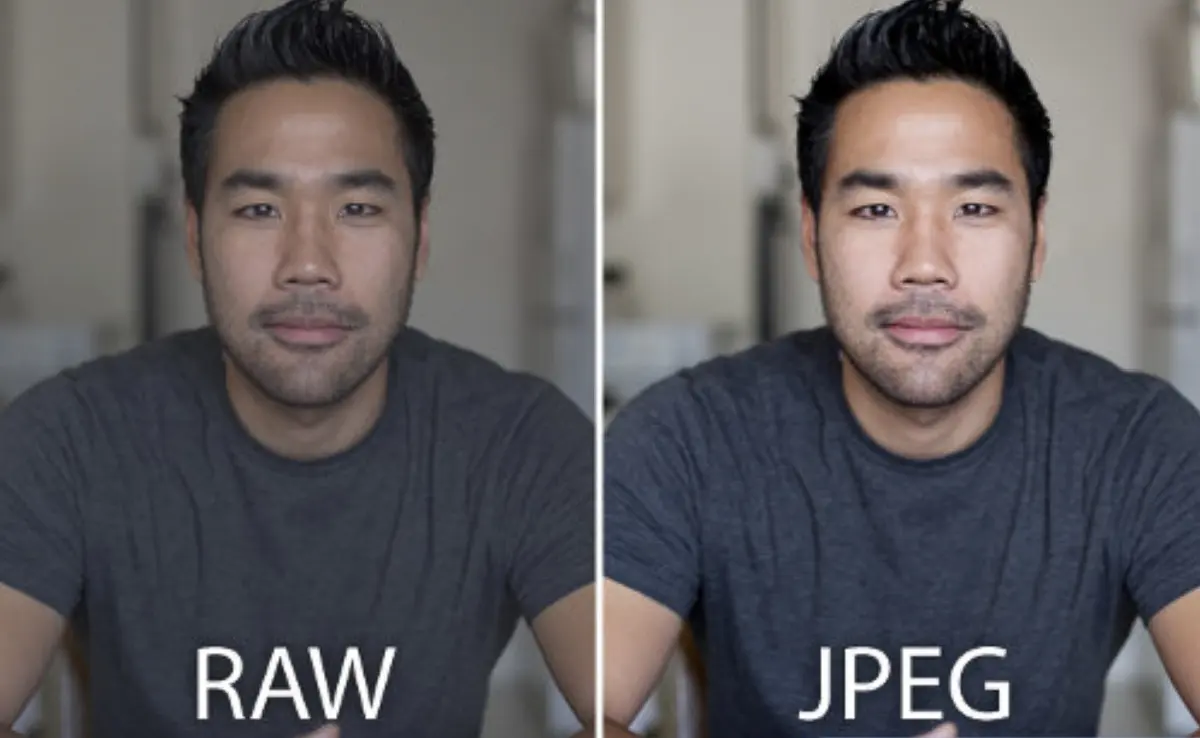
Another common error is assuming that RAW files will look perfect straight out of the camera. Because the camera does not apply contrast or sharpening, a RAW file often appears dull or "flat" on the back of the camera screen. New photographers often mistake this for a poor-quality image. Remember that the RAW format is designed to be a starting point, not a final product. You must commit time to post-processing to realize the full potential of your images.
Best practices for RAW workflow
Establishing a consistent workflow is essential for managing a large volume of RAW files. Start by organizing your files into folders categorized by date or project name immediately after transferring them from your camera. Use a reliable backup system, such as an external hard drive or cloud storage, to ensure your original digital negatives are protected against hardware failure.
- Use a fast card reader to transfer files to your computer quickly.
- Cull your photos by deleting duplicates or out-of-focus shots before starting the edit.
- Use presets to apply a consistent look across a series of photos from the same shoot.
- Regularly update your editing software to ensure compatibility with the latest camera models.
By maintaining a clean, organized library, you ensure that your RAW files remain accessible for future edits. As your skills improve, you may want to revisit older RAW files to apply new techniques, which is only possible if you have kept your original files in a well-managed archive.
Key facts
- RAW files contain minimally processed data directly from the camera's image sensor, often called a "digital negative."
- Unlike JPEG files, which are compressed and processed in-camera, RAW files retain all original image information for maximum editing flexibility.
- RAW files are significantly larger than JPEGs because they store high-bit depth data, typically 12 or 14 bits per channel.
- You must use specialized software like Adobe Lightroom, Capture One, or manufacturer-specific tools to develop and export RAW files.
- White balance, exposure, and contrast settings are not "baked into" a RAW file, allowing you to adjust them non-destructively after shooting.
- Always shoot in RAW if you intend to print your photos or perform significant color grading, as it prevents quality loss during editing.
The bottom line
RAW format is the professional standard for photographers who demand complete control over their final image. By capturing every detail recorded by the sensor, it provides unparalleled latitude for adjusting exposure, color, and detail during editing. While these files require more storage space and dedicated software to process, the ability to recover highlights and shadows makes RAW an essential tool for achieving high-quality, professional-grade results.
People also ask
Why do RAW files look flat or dull when I first open them?
RAW files appear flat because they lack the contrast, saturation, and sharpening adjustments that cameras automatically apply to JPEGs. They are intended to be a blank canvas that you finish yourself during the post-processing stage.
Can I share RAW files directly to social media?
Most social media platforms do not support RAW file formats and will not display them correctly. You must first edit the file and export it as a JPEG or PNG to ensure it is compatible with web viewing.
Does shooting in RAW affect my camera's burst speed?
Yes, because RAW files are much larger, they take longer for the camera to write to the memory card. This can fill the camera's buffer faster, potentially slowing down the number of frames you can capture per second during continuous shooting.
Is there a universal RAW file format?
While most manufacturers use proprietary formats like .CR3 for Canon or .NEF for Nikon, the DNG (Digital Negative) format was created by Adobe as an open, universal standard. Some cameras allow you to save directly to DNG, while software can convert proprietary files to this format.
What is the biggest mistake beginners make with RAW files?
The most common mistake is failing to back up the original files or forgetting to export them into a viewable format. Once you delete the RAW file, you lose the ability to re-process the image with different settings in the future.
Do I need a powerful computer to edit RAW photos?
Editing RAW files requires more processing power and RAM than editing JPEGs because the software must render the high-resolution data in real-time. A modern computer with a dedicated graphics card and at least 16GB of RAM is recommended for a smooth experience.
This answer was created with the help of AI research tools and reference sources. Spotted an error? Let us know — we correct mistakes quickly. See our editorial policy.