What is a vector image?
Short answer
A vector image is a digital graphic composed of mathematical paths—lines, curves, and shapes—defined by geometric formulas rather than a grid of colored pixels. Because these paths scale infinitely without losing resolution, vector files remain crisp and clear at any size, making them the industry standard for logos, typography, and technical illustrations.

On this page
How do vector images work?
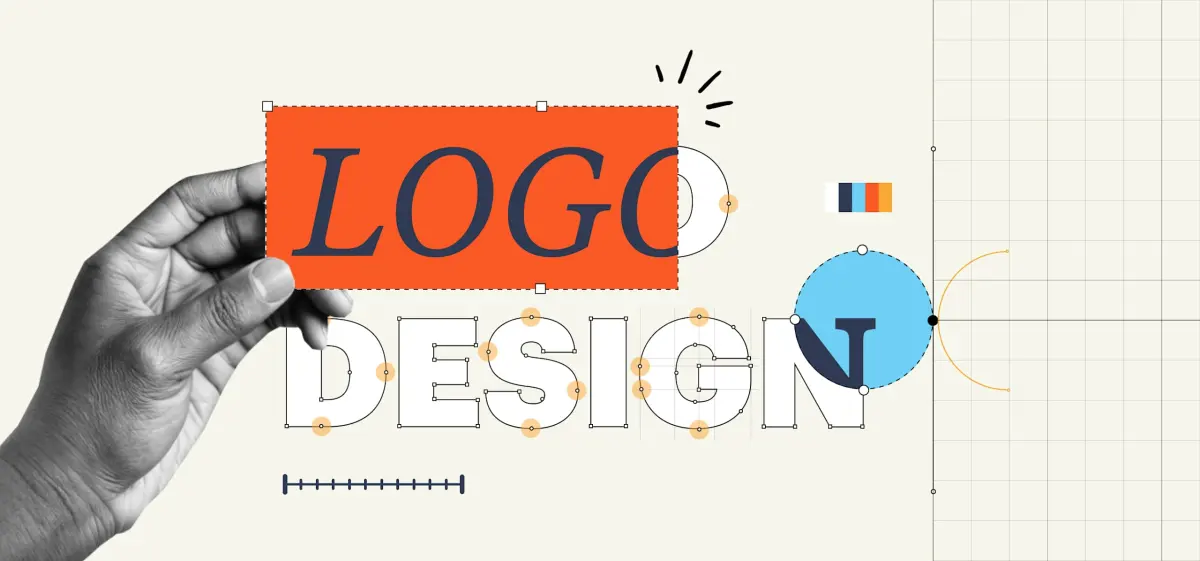
Vector graphics rely on coordinate geometry to render images. Instead of storing information for every individual pixel, a vector file contains instructions for the computer to draw shapes based on points, lines, and curves. These mathematical expressions, often based on Bézier curves, determine the position, color, and thickness of each element. When you zoom into a vector image, the software recalculates these formulas in real time, ensuring the edges remain perfectly sharp regardless of the magnification level.
This fundamental difference in data structure sets vectors apart from raster images, which are static grids of pixels. Because raster images have a fixed resolution, they become blurry or "pixelated" when enlarged beyond their original dimensions. Vectors avoid this limitation entirely because they are resolution-independent. Whether you are designing a small business card or a massive billboard, the underlying mathematical data remains the same, providing consistent quality across all print and digital media platforms.
What are the most common vector file formats?
Choosing the right file format is essential for maintaining compatibility and editability across different design software. Each format serves a specific purpose, ranging from raw project files to universal assets used for web and print.
- .AI (Adobe Illustrator): The native format for industry-standard design software, containing complex layers and editable paths.
- .EPS (Encapsulated PostScript): A legacy format widely used for high-quality printing and compatibility with older software.
- .SVG (Scalable Vector Graphics): An XML-based format optimized for web browsers, allowing for fast loading and interactive elements.
- .PDF (Portable Document Format): A versatile format that can contain both vector and raster data, commonly used for sharing final proofs.
Understanding these formats helps you manage your workflow effectively. While .AI files are best for the creative process, converting your final work to .SVG is usually the best choice for web development, as it keeps file sizes small while maintaining perfect clarity on high-resolution screens.

Why use vector graphics for logos and branding?
Professional branding requires consistency across a vast array of physical and digital surfaces. A logo must appear identical on a tiny social media profile icon, a standard letterhead, and a large-scale storefront sign. Because vector images scale infinitely, they are the only practical choice for logos and icons. Using a raster format for branding often leads to unprofessional results, such as blurry edges or jagged lines when the image is stretched to fit a larger layout.
Beyond scalability, vector files are highly efficient for editing. Designers can easily adjust the color, shape, or thickness of a stroke without affecting the rest of the composition. This flexibility is critical during the iterative design process, where small tweaks to a brand’s visual identity are frequent. By maintaining the original vector source files, companies ensure their branding remains sharp, editable, and future-proof as their marketing needs evolve over time.

How to create and edit vector images
Creating vector graphics requires specific software designed to handle mathematical paths. While the learning curve can be steeper than photo-editing tools, mastering the basic pen tool is a foundational skill for any designer.
- Select a vector-based program such as Adobe Illustrator, Affinity Designer, or Inkscape.
- Use the "Pen Tool" to click and drag, creating anchor points that define the curves and corners of your shape.
- Apply "Strokes" to define the outline and "Fills" to add solid colors or gradients to the interior of your shapes.
- Use the "Selection Tool" to move, resize, or rotate your paths without losing quality.
- Export your final design as an .SVG or .PDF to ensure it remains scalable for your intended use.
Practice is key to mastering these tools. Start by tracing simple geometric shapes before moving on to complex illustrations or typography. Consistency in placing anchor points will result in smoother curves and smaller, more efficient file sizes.
Common mistakes when working with vector files
Even experienced designers can run into issues when handling vector assets. One of the most frequent errors is the accidental inclusion of raster images within a vector file. If you import a photograph into a vector document and save it, that specific element will still be subject to pixelation, defeating the purpose of using a vector format. Always check your layers to ensure all components are true vector paths.
Another common mistake is failing to convert text to outlines before sharing files. If the recipient does not have the specific font installed on their computer, the text will default to a different style, ruining the design. To avoid this, select your text and use the "Create Outlines" command, which converts the letters into editable vector shapes. Finally, avoid over-complicating your paths; too many unnecessary anchor points can make a file sluggish to edit and unnecessarily large. Keep your paths clean and simple to ensure your project remains professional and easy to manage throughout the entire production process.
Key facts
- Vector images use mathematical formulas to define shapes, lines, and colors instead of a fixed grid of pixels.
- Because they are based on geometry, vector files can be scaled to any size without losing resolution or quality.
- Common file extensions for vector graphics include .SVG, .EPS, .AI, and .PDF.
- Adobe Illustrator, released in 1987, remains the industry-standard software for creating and editing vector artwork.
- Vector files are typically much smaller in size than high-resolution raster images because they store instructions rather than millions of individual pixel color values.
- To avoid common errors, always ensure your vector paths are closed and avoid over-complicating designs with excessive anchor points, which can slow down rendering.
The bottom line
Vector images are the essential building blocks for professional design, offering unmatched flexibility through mathematical precision. By relying on geometric paths rather than static pixels, these files remain perfectly sharp at any scale, making them ideal for logos, typography, and complex illustrations. Understanding when to use vector versus raster formats is a fundamental skill for anyone working with digital media, printing, or brand identity development.
People also ask
What is the difference between vector and raster images?
Raster images are made of a fixed grid of pixels, meaning they become blurry or "pixelated" when enlarged. Vector images use mathematical paths, allowing them to scale infinitely without any loss of clarity.
Can I convert a photo into a vector image?
You can trace a photo using software tools, but the result is a stylized graphic rather than a photographic reproduction. Complex photographs contain too much color data to be efficiently converted into standard vector paths.
Why do professional logos use vector formats?
Logos must appear crisp on everything from a business card to a massive billboard. Vector formats ensure the brand identity remains sharp and professional regardless of the printing surface or digital screen size.
How do I edit a vector file if I do not have professional software?
You can use free, open-source tools like Inkscape to open and modify common vector formats like .SVG. Web-based vector editors are also available for quick adjustments without installing complex programs.
Are all PDF files considered vector images?
Not necessarily, as a PDF can contain both vector graphics and embedded raster images. If you zoom into a PDF and the text or shapes remain perfectly smooth, they are vector-based elements.
What is the best way to share vector files with print shops?
Most professional printers prefer .EPS or .PDF files with all fonts converted to outlines. This ensures the design looks exactly the same on their equipment as it does on your computer.
This answer was created with the help of AI research tools and reference sources. Spotted an error? Let us know — we correct mistakes quickly. See our editorial policy.