How do you make a storyboard?
Short answer
A storyboard is a visual sequence of illustrations or images displayed in order to pre-visualize a motion picture, animation, or interactive media sequence. You create one by sketching key scenes, adding descriptive notes about camera angles, dialogue, and timing, and refining the flow to ensure your narrative structure remains cohesive throughout production.

On this page
How to start a storyboard from scratch
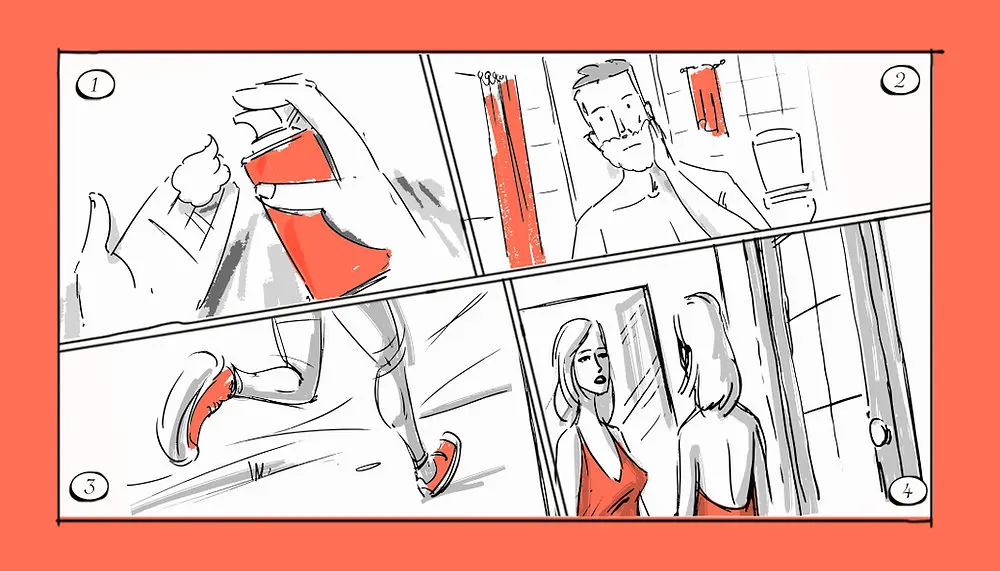
The process begins with a clear script or a written outline of your project. Before drawing a single frame, identify the essential narrative beats that drive the story forward. You must decide on the aspect ratio of your project, such as 16:9 for widescreen video, to ensure your drawings match the final output. Use simple templates featuring rectangular boxes for visuals and dedicated space below for notes.
Focus on the core action rather than artistic perfection. Stick figures are often more effective than detailed illustrations because they keep the focus on composition and pacing. Your goal is to map out the visual journey of the viewer. Once you have the structure, you can determine which shots are necessary to convey the plot.
- Read your script thoroughly to identify key turning points.
- Sketch rough thumbnails for every major scene transition.
- Add arrows to indicate camera movement like pans or zooms.
- Write brief dialogue or sound cues beneath each frame.
- Review the sequence to check for logical flow and pacing.
Best tools for storyboard beginners
You do not need expensive software to create a functional storyboard. Many professionals still prefer pencil and paper because it allows for rapid iteration and creative freedom. Using a printed template with blank frames helps maintain consistent proportions across your project. This traditional approach is excellent for beginners who want to focus on visual storytelling without technical distractions.
If you prefer digital methods, several accessible options exist. Basic graphic design software or dedicated tablet applications allow you to layer images and rearrange frames easily. These tools often provide pre-made grids and digital pens that mimic the feel of traditional sketching. Regardless of the medium, the primary objective remains the same: organizing your visual ideas into a coherent, chronological sequence that communicates your vision to the rest of your production team.
- Traditional paper and pencil: Ideal for quick, low-pressure drafting.
- Whiteboards: Perfect for collaborative brainstorming and rearranging scenes.
- Tablets with stylus: Combines digital flexibility with a natural drawing feel.
- Basic presentation software: Useful for organizing digital images into a slide-based storyboard.
Why storyboard organization matters
A well-organized storyboard acts as a blueprint for your entire production. It eliminates ambiguity by showing exactly how a scene should look, where characters are positioned, and how the camera moves. When everyone on a crew understands the visual plan, you save significant time during filming or animation. This preparation prevents costly mistakes, such as forgetting to shoot a necessary reaction shot or miscalculating the duration of a sequence.
Furthermore, storyboarding helps you identify pacing issues early. If a sequence feels too slow or confusing on paper, you can adjust the order of frames or remove unnecessary shots before production begins. This process of refinement is significantly cheaper and faster than editing footage after it has been captured. By investing time in the planning phase, you ensure that your final product is polished, professional, and aligned with your original creative intent.
Common mistakes when storyboarding
One frequent error is over-detailing individual frames. Beginners often spend too much time on shading or background textures, which detracts from the overall flow of the narrative. Remember that the storyboard is a functional tool, not a final piece of art. If you spend hours on a single frame, you lose the ability to iterate quickly and test different visual approaches for your project.
Another mistake is ignoring the technical limitations of your medium. For example, drawing a complex crane shot that your camera equipment cannot actually perform leads to frustration during production. Always consider the practical realities of your gear and environment while you draw. Additionally, failing to include camera directions, such as close-ups versus wide shots, creates confusion for the crew. Always annotate your frames with specific technical details to ensure your vision is executed correctly on set.
How long does it take to storyboard
The time required to complete a storyboard depends on the complexity of your project and your level of detail. A simple commercial might take a few hours to outline, while a feature-length film or complex animation could take several weeks. Break your project into manageable segments, such as scenes or sequences, to avoid feeling overwhelmed. Setting a firm deadline for each section helps maintain momentum and ensures you stay on track.
Efficiency improves with practice and a clear workflow. Many creators find that spending more time on the initial script and thumbnails reduces the need for extensive revisions later. If you are working on a tight schedule, focus on "key frames" that represent the most important moments of the story rather than every single movement. This approach provides enough guidance for the production team while allowing for creative flexibility during the actual filming or animation process. By balancing detailed planning with practical time management, you produce a roadmap that guides your project to a successful completion.
Key facts
- A storyboard is a sequence of drawings or images representing the shots planned for a film, video, or animation.
- Walt Disney Studios is widely credited with popularizing the modern storyboard process during the production of Steamboat Willie in 1928.
- The primary purpose of a storyboard is to visualize the narrative flow and identify potential technical issues before filming begins.
- Standard storyboards include space for dialogue, camera angles, lighting notes, and transitions between scenes.
- You do not need to be a professional artist to create a storyboard; simple stick figures are sufficient to convey blocking and composition.
- Digital software like Storyboarder or Procreate can streamline the process, but pen and paper remain the most accessible tools for beginners.
The bottom line
Creating a storyboard is a vital pre-production step that bridges the gap between a written script and the final visual product. By mapping out camera angles, character movements, and scene transitions, you gain a clear blueprint for your project. This process saves time and resources by allowing you to solve narrative problems early, ensuring that your final production remains focused, efficient, and true to your vision.
People also ask
Do I need to be a good artist to make a storyboard?
No, artistic skill is not required. The goal is to communicate visual ideas, camera placement, and character movement rather than to create a polished illustration.
What is the difference between a storyboard and a script?
A script provides the written dialogue and narrative action, while a storyboard translates those words into visual cues. The script tells the story, and the storyboard shows how the camera will capture it.
How many frames should a storyboard have?
There is no fixed number of frames. The length depends entirely on the complexity of your project and the number of distinct camera shots required to tell the story.
What is an animatic?
An animatic is a preliminary version of a movie or animation created by syncing storyboard frames with a temporary soundtrack. It helps creators test the timing and pacing of the final edit.
Can I storyboard a project that does not involve video?
Yes, storyboards are frequently used in UX design, advertising, and marketing to map out user journeys or the flow of a presentation. They help stakeholders understand how an experience unfolds over time.
What are the most common mistakes when storyboarding?
A common mistake is focusing too much on detail rather than composition. Another error is failing to indicate camera movement, such as pans or zooms, which leaves the camera crew confused about the intended shot.
This answer was created with the help of AI research tools and reference sources. Spotted an error? Let us know — we correct mistakes quickly. See our editorial policy.