What is augmented reality?
Short answer
Augmented reality is a technology that overlays digital information, such as images, sounds, or text, onto the physical world in real time. By using cameras and sensors on devices like smartphones or headsets, it blends virtual elements with your actual surroundings, enhancing your perception of reality rather than replacing it entirely.
On this page
How does augmented reality work?
Augmented reality functions by using a combination of hardware and software to map the physical environment. Devices utilize cameras, depth sensors, and accelerometers to identify surfaces, objects, and spatial dimensions. Once the hardware captures the surroundings, the software processes this data to anchor digital content in specific locations, ensuring that virtual objects appear to stay in place even when the user moves.
The process relies on three core components: tracking, registration, and rendering. Tracking determines the position and orientation of the device, while registration aligns the virtual objects with the physical world. Rendering then displays the graphics so they appear integrated with the environment. This technology is currently categorized into several distinct types that determine how the user interacts with the digital overlay:
- Marker-based AR: Uses specific images or QR codes to trigger the display of virtual content.
- Markerless AR: Uses GPS, digital compasses, and accelerometers to place objects based on the user's location.
- Projection-based AR: Projects artificial light onto physical surfaces to create interactive displays.
- Superimposition-based AR: Replaces a physical object with a virtual view, often used in medical imaging.
What are the practical applications of AR?
The utility of augmented reality extends far beyond entertainment, impacting fields like medicine, manufacturing, and retail. Surgeons use AR headsets to overlay patient anatomy data onto the body during procedures, improving precision. In manufacturing, workers use smart glasses to view assembly instructions directly on machinery, which reduces errors and increases safety. These applications demonstrate how digital layers provide context that humans cannot see with the naked eye.
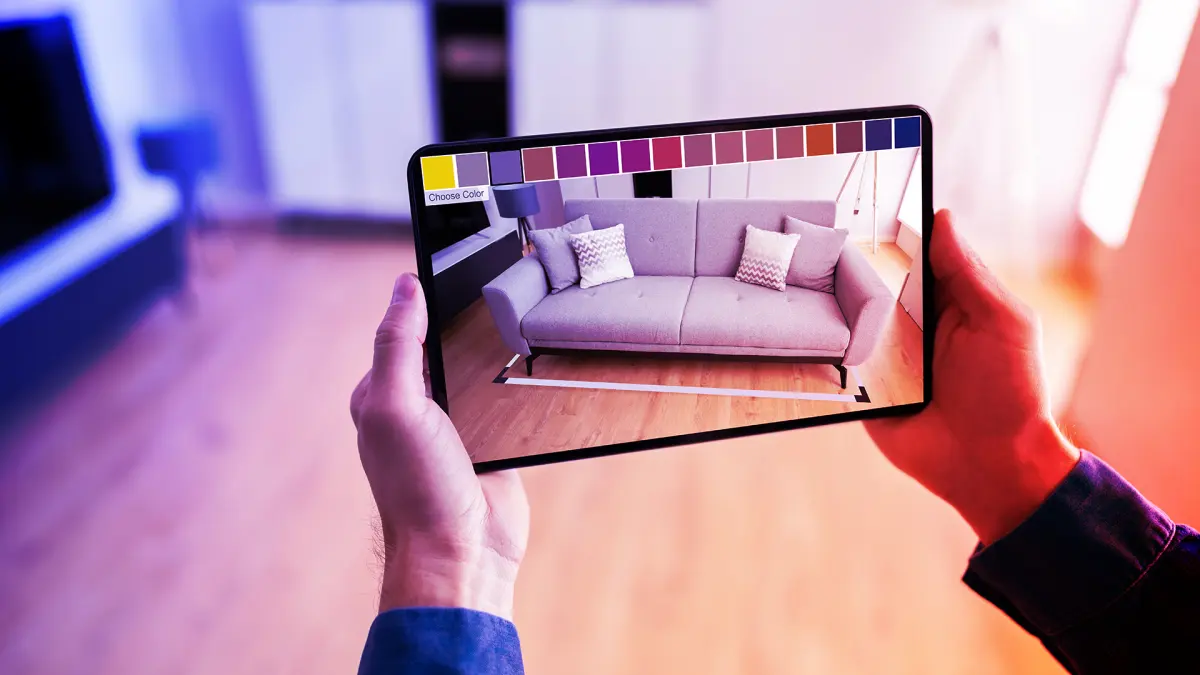
Retailers have also adopted this technology to improve the customer experience by allowing users to visualize products in their own homes before purchasing. By using a smartphone camera, a customer can place a virtual sofa in their living room to check for fit and style. This practical application helps bridge the gap between digital shopping and physical reality. Key sectors utilizing these tools include:
- Healthcare: Surgical navigation and medical training simulations.
- Education: Interactive textbooks that display 3D models of historical artifacts.
- Retail: Virtual try-on tools for glasses, makeup, and footwear.
- Logistics: Warehouse navigation systems that highlight the fastest routes to inventory.
How to get started with augmented reality
Most people already possess the hardware necessary to experience augmented reality through their current smartphones or tablets. You do not need expensive specialized equipment to begin exploring these tools. Most modern mobile operating systems, such as iOS and Android, have built-in support for AR platforms that allow developers to create immersive experiences accessible through standard camera applications.
To begin, visit your device's application store and search for categories labeled "AR" or "Augmented Reality." Many popular social media platforms also offer AR filters that allow you to modify your environment or appearance in real time. If you are interested in creating your own experiences, you can download free development kits provided by major technology companies. These kits offer drag-and-drop interfaces that allow beginners to build simple scenes without needing advanced programming skills.
- Ensure your device software is up to date to support the latest AR frameworks.
- Grant the application permission to access your camera and location services.
- Find a well-lit area with clear floor space to help the device track surfaces accurately.
- Slowly move your phone to allow the sensors to scan the environment before placing objects.

Why augmented reality experiences fail
The most common reason for a poor AR experience is inadequate environmental tracking. Augmented reality requires a stable, well-lit environment to function correctly. If a room is too dark, the camera cannot identify textures or edges, which causes virtual objects to drift, flicker, or disappear entirely. Similarly, surfaces with high reflectivity, such as mirrors or polished metal, confuse the sensors because they cannot accurately calculate depth or distance.
Another frequent issue is the lack of "occlusion," which occurs when a virtual object fails to hide behind a physical one. When a digital character walks in front of a real chair but remains visible through it, the immersion is broken. While newer hardware is improving this, many basic applications still struggle to understand the depth hierarchy of a room. Users should also be aware that running these applications consumes significant battery power and can cause devices to overheat during extended sessions.
Common mistakes when using AR
One of the biggest mistakes users make is failing to calibrate their device before starting an experience. Most applications will prompt you to move your phone in a circular motion to map the area; skipping this step leads to inaccurate placement of digital items. Additionally, users often try to use AR in cluttered environments. Too many objects in the frame can overwhelm the software, making it difficult for the device to distinguish between the floor, walls, and furniture.
Finally, avoid walking while using AR applications, as it poses a significant safety risk. Because the screen is occupied by digital overlays, your awareness of physical obstacles like stairs, furniture, or other people is severely diminished. Always remain stationary in a clear space when interacting with virtual content to prevent falls or collisions. By maintaining a clean environment and following the calibration prompts, you can ensure a much smoother and more reliable experience with any augmented reality application you choose to use.
Key facts
- Augmented reality (AR) overlays digital information, such as images or text, onto the real-world environment.
- Unlike virtual reality, which creates a fully immersive digital world, AR keeps the user connected to their physical surroundings.
- The term was coined in 1990 by Boeing researcher Tom Caudell while developing a head-mounted display for aircraft wiring.
- Common AR devices include smartphones, tablets, and specialized wearable glasses like the Microsoft HoloLens or Apple Vision Pro.
- To experience AR on a phone, ensure your device is updated to the latest operating system to support ARKit or ARCore frameworks.
- Avoid using AR in crowded or dimly lit areas, as poor lighting prevents the device's camera from accurately mapping surfaces.
The bottom line
Augmented reality bridges the gap between the digital and physical realms, providing tools that enhance our perception of the world. By integrating interactive graphics into our daily environment, it transforms how we shop, learn, and navigate. As hardware becomes more sophisticated and accessible, this technology will continue to integrate seamlessly into our everyday lives, offering practical solutions that make information more immediate, visual, and intuitive.
People also ask
How does augmented reality differ from virtual reality?
Virtual reality replaces your physical environment with a completely simulated digital one, requiring a headset that blocks out the real world. Augmented reality enhances your current physical view by adding digital elements, allowing you to interact with both the real and virtual simultaneously.
Can I use augmented reality on my current smartphone?
Most modern smartphones manufactured after 2017 support AR functionality through their native cameras. You can access these features by downloading apps from the App Store or Google Play that utilize AR for gaming, home design, or educational purposes.
What are the most common uses for augmented reality today?
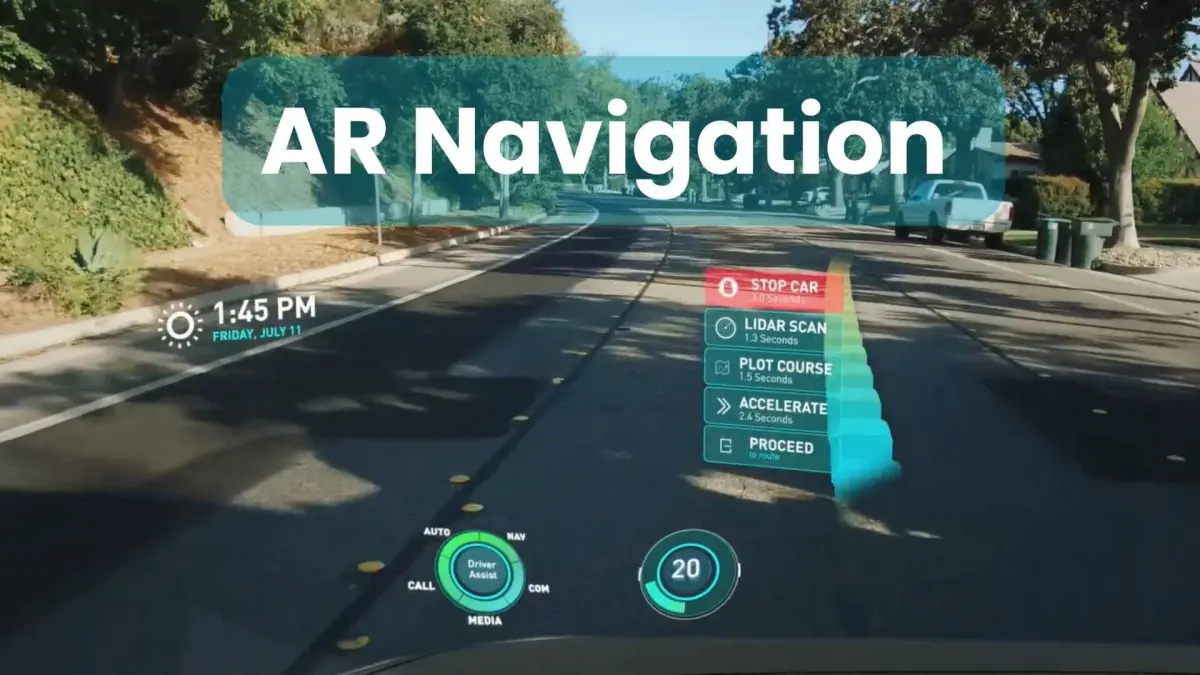
Retailers use AR to let customers virtually "try on" glasses or place furniture in their homes to see how it fits. It is also widely used in navigation apps to show directional arrows on the road and in medical training to visualize complex anatomical structures.
Is augmented reality dangerous to use in public?
Using AR requires your full attention, which can lead to tripping hazards or collisions if you are walking while looking at your screen. Always remain stationary or in a safe, controlled environment when using AR applications to prevent accidents.
What hardware is required for a professional-grade augmented reality experience?
While phones are common, professional AR often uses specialized headsets equipped with depth-sensing cameras and spatial sensors. These devices map the room's geometry in real time to ensure that digital objects remain anchored to physical surfaces as you move.
Does augmented reality require an internet connection?
Many AR applications require a connection to download assets or sync data, though the core tracking technology often runs locally on your device. Once the necessary files are downloaded, some basic AR features can function offline.
This answer was created with the help of AI research tools and reference sources. Spotted an error? Let us know — we correct mistakes quickly. See our editorial policy.